TECHFOTO
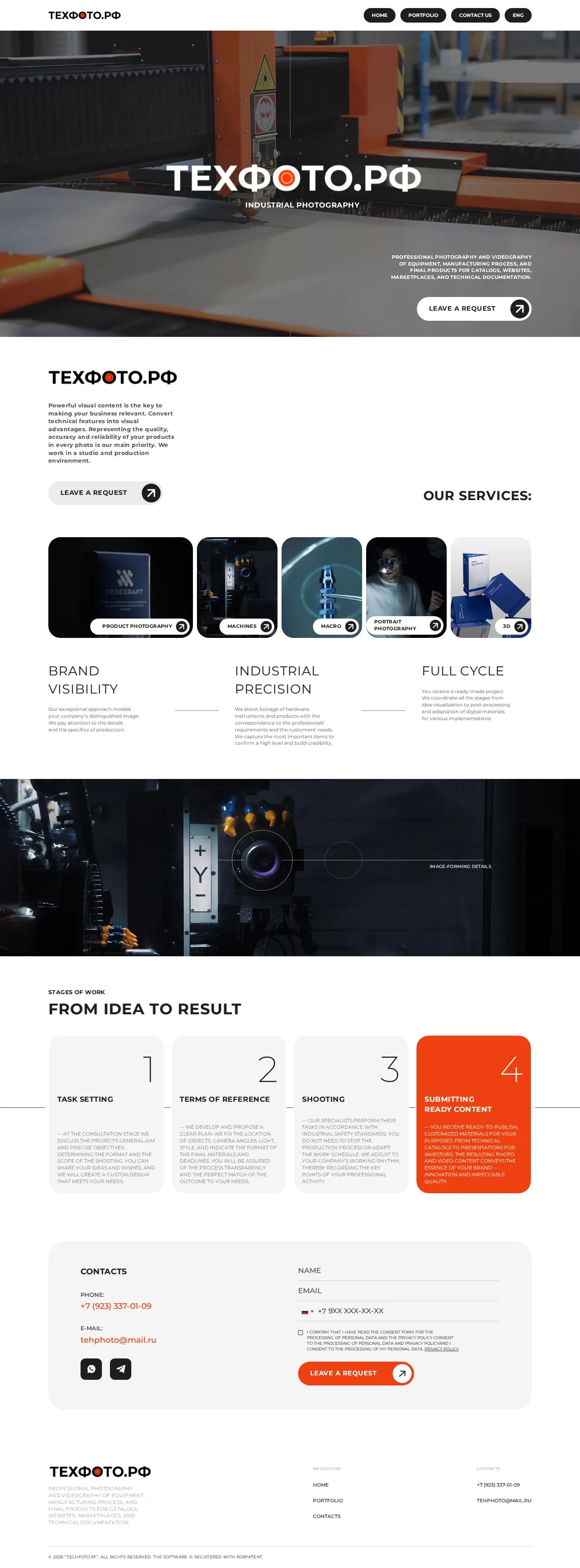
A B2B website for an industrial photo and video studio, built around a portfolio of shoots, clear services and a request form.
- Client
- TECHFOTO
- Industry
- Industrial photography
- Project duration
- 1.5 months
- Role
- Design, development and launch
- WordPress
- PHP
- JavaScript
- Contact Form 7
- Custom Theme
The challenge
TECHFOTO is a studio that shoots professional industrial photo and video: machine tools, production lines and factories. Industrial photography is a visual product. A text can't sell it; only the finished shots can. A potential client judges the studio's work by seeing the photos and videos, so the site had to show the shoots in a way that makes the technical precision clear from the first screen.
The visitors are businesses: manufacturers, plants and equipment suppliers who need material for catalogs, websites, presentations and marketing. They arrive with a specific task and want to know quickly whether the studio shoots their type of object, what the result looks like, and how to send a request. On top of that, new work appears after every shoot and services change over time, so the studio needed to update the portfolio itself. Otherwise the portfolio falls behind.
What I built
I built a custom WordPress theme around three parts of a B2B site: a portfolio of completed shoots, a clear description of services and a shoot request form. Server logic in PHP adds a custom structure for the portfolio and services on top of the standard CMS, and JavaScript runs the gallery and image viewer.
Every new shoot is added as a content item through simple fields in the admin, not through raw markup. Requests come in through Contact Form 7, and the studio can change the form fields and recipient itself. The project took 1.5 months.
Key features
- Industrial shoot portfolio — a grid of completed photo and video work on machinery, production lines and factories, so a client sees the studio's level quickly.
- Project pages — each shoot with its images, object type and a short task description, giving clients context for similar production.
- Services section — what the studio shoots and in what format, with a direct path to the request form.
- Shoot request form — a short Contact Form 7 form for describing the object and task, delivered to the studio by email.
- Gallery and image viewer — enlarged images you can page through, so clients can study details like metal texture and lighting.
- About and trust sections — what the studio does and its approach, so a client can assess it before sending a request.
- Responsive layout — the portfolio grid adapts to any screen and the shots stay sharp on phones.
- Admin content management — the studio adds shoots and edits services and texts after each project.